Overview
Lizard is an AI-native cloud deployment platform designed for the era of coding agents. It allows developers and AI tools such as Claude Code, Codex, and Cursor to ship applications, databases, and sandboxes directly from the command line. The platform positions itself as a modern PaaS that combines the convenience of managed infrastructure with the flexibility of per-second billing and machine-readable outputs.
The platform's primary differentiator is its focus on autonomous development workflows. Where traditional platforms assume a human operator, Lizard structures every command, event, and log entry to be parsable by software agents. This makes it possible for an AI to deploy an app, observe its runtime behavior, and iterate on code without human intervention. The homepage states that Lizard is "built for agents, not adapted for them," a claim that is supported by features like the agent-first CLI and sandboxed code execution.
Lizard's technical stack includes a build planner called lizardpack, which analyzes repositories and generates transparent multi-stage Dockerfiles. The platform supports a wide array of languages and frameworks, including Node.js, Python, Go, Rust, Ruby, PHP, Java, and static sites. Managed Postgres, Redis, and S3-compatible object storage can be provisioned with single commands, and the platform automatically connects them to the deployed application.
The company's website does not disclose its founding date, headquarters, or team size, but the product shows a level of maturity that suggests a dedicated engineering effort. The homepage includes a cost comparison tool that shows Lizard can be significantly cheaper than AWS, Render, and Fly.io for typical workloads. With a free tier that includes $5 of monthly credit, Lizard lowers the barrier to entry for developers curious about AI-integrated deployment solutions.
Services & Expertise
Lizard's service catalog is centered on automation and developer productivity. Each offering is designed to minimize manual configuration and to be fully accessible via both the web dashboard and the CLI.
Git Push to Deploy - The core deployment mechanism. When a developer pushes to the main branch, Lizard automatically detects the programming language, builds the project using a generated Dockerfile, and deploys it to an isolated environment. This model removes the need for continuous integration scripts and allows agents to trigger deployments by simply committing code.
Managed Postgres - A one-command solution for provisioning a PostgreSQL database. Lizard handles the underlying infrastructure, including high availability, backups, and security patches. The database is immediately connected to the application through environment variables, and users can scale resources independently. The per-second billing on database instances is particularly useful for development environments that are not constantly under load.
Managed Redis - A fully managed in-memory data store that can be added to any project with a single CLI invocation. Redis instances are preconfigured for typical use cases like caching and message queuing, and they integrate seamlessly with the app's connection settings. This service eliminates the operational burden of operating a dedicated Redis server.
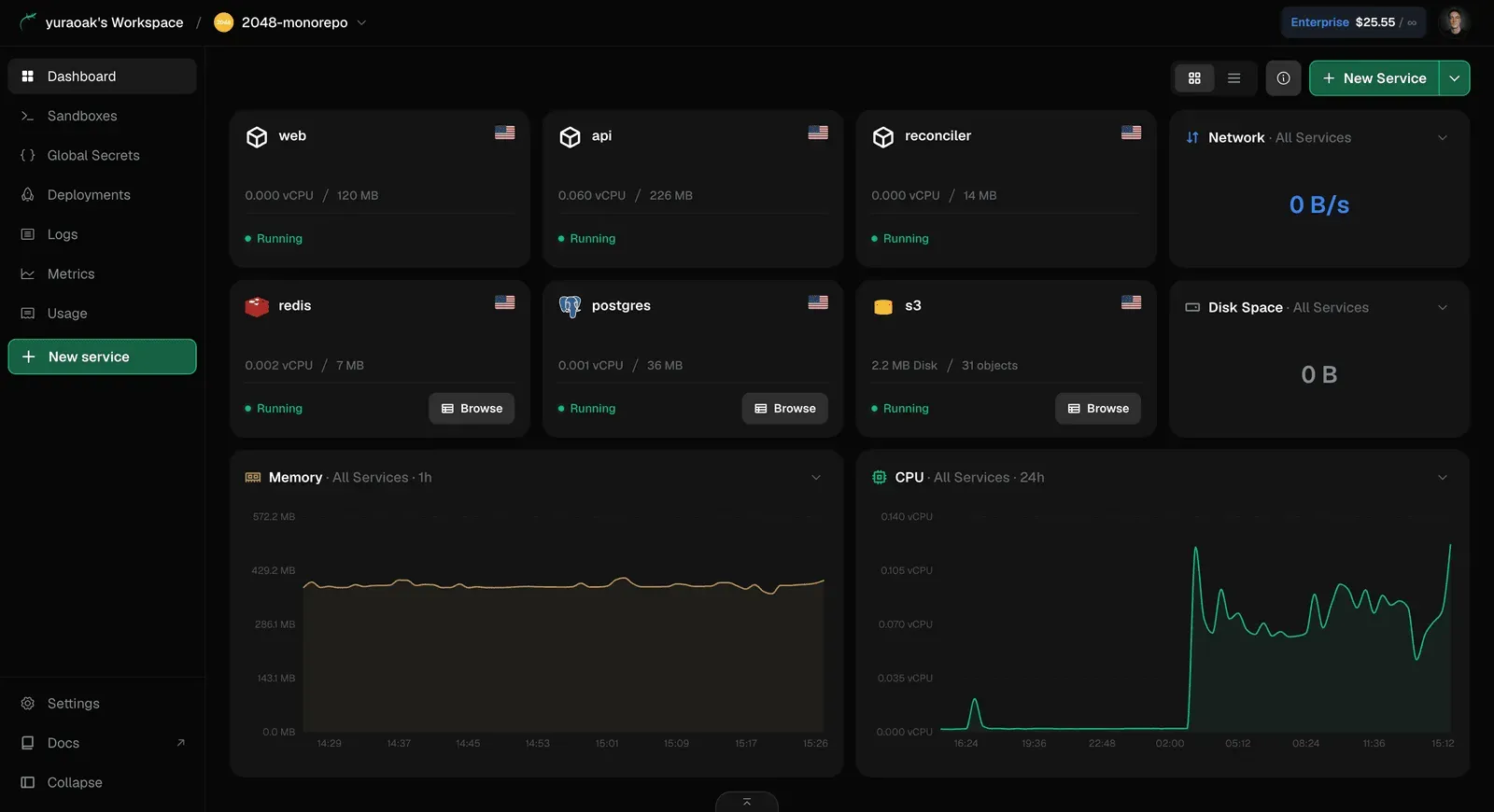
Managed Object Storage - Lizard provides an S3-compatible object storage service for storing unstructured data such as user uploads, static assets, and backups. Storage usage is billed at a granular level, and the service works with existing AWS SDKs, making migration straightforward. The platform's dashboard shows detailed metrics for storage consumption and object counts.
Agent-First CLI - The command-line interface is arguably Lizard's most distinctive feature. Designed from the ground up with AI agents in mind, it emits structured, machine-readable data for every action. This includes deployment status, error codes, log lines, and cost estimates. The CLI is installable globally via npm and can be invoked by agents through natural language commands, as demonstrated in the homepage's "Claude Code" terminal mockup.
Live Logs & Metrics - Observability is embedded into the platform. Users can view real-time logs for every service, filter by time and severity, and inspect request metrics like latency and error rates. The dashboard includes a resource utilization panel that shows CPU and memory usage over time, helping developers identify performance bottlenecks. The same logs can be streamed directly into a terminal, which is useful for debugging during deployment.
Sandboxes - Lizard offers isolated sandbox environments that are particularly valuable for AI agents that need to execute code safely. Unlike traditional shell access, these sandboxes return typed results, making it easier for agents to process output as data. Sandboxes can be used for testing code snippets, running data transformations, or evaluating the output of generated code.
Per-Second Billing - Lizard's pricing model is not a feature but a foundational design principle. The platform measures actual CPU time, memory usage, and egress traffic and bills accordingly. This is in contrast to providers that charge for a fixed instance size even when idle. The homepage's cost comparison widget demonstrates how this can lead to material savings, especially for applications with low average utilization.
How They Work
Getting started with Lizard is designed to be intuitive for both humans and agents. The first step is to install the CLI globally using npm: npm i -g @lizard-build/cli. After authenticating, the user is ready to deploy an application from any directory. The primary command is lizard up, which initiates the entire lifecycle from build to deployment.
The build process begins with lizardpack, Lizard's build planner. This tool scans the repository, detects the language and framework, and constructs a multi-stage Dockerfile. This Dockerfile is not hidden; it is committed to the user's project and can be reviewed and modified. This transparency is a deliberate choice, as it allows AI agents to understand the build steps and iterate on them if needed. Once the Dockerfile is ready, Lizard executes the build and pushes the resulting image to its container registry.
After a successful build, Lizard automatically provisions the necessary services. If the user has not yet created a database or cache, they can be added on the fly with commands like lizard postgres:create or lizard redis:create. The platform then updates the environment variables for all connected services, ensuring that the application has the correct connection strings. The deployment runs in its own isolated container, with resource limits and a defined network policy.
For AI agents, Lizard provides an official skill that can be installed via npx skills add lizard-build/skill -g. This skill gives agents explicit instructions on how to use the platform, including the correct CLI commands and how to parse the structured output. When a deployment fails, the CLI returns a detailed error code and a machine-readable explanation, enabling the agent to diagnose the issue and redeploy a fixed version automatically. The dashboard offers a human-friendly view of the same information, with live status indicators and log streams.
Lizard also includes convenience features like the ability to restore deleted services, databases, and entire projects. This is a safety net that is not commonly found on competing platforms. The billing dashboard breaks down costs by resource type and provides a forecast of monthly usage, allowing teams to monitor their spending in real time.
Ideal Client Profile
Lizard is not intended for every developer, but it is a superb match for specific use cases. The following profiles illustrate the types of users who would benefit most from adopting the platform.
A solo developer building AI-assisted side projects. An individual who uses Claude Code or Cursor to write applications can use Lizard to deploy without worrying about infrastructure. The free $5 credit is enough to host a small app and a Postgres database for a month, making it risk-free to try. The CLI's terse output keeps the developer informed without overwhelming the terminal.
A startup team with a lean engineering staff. A two- or three-person startup moving quickly from prototype to production needs to minimize operational overhead. Lizard's managed services eliminate the need for a dedicated DevOps engineer. The per-second billing ensures that even if the app is only used sporadically, the monthly bill stays low, which is essential for a company with limited runway.
An engineering team that is actively building with AI agents. Organizations that have integrated AI agents into their CI/CD pipeline will find Lizard to be a natural extension. The machine-readable CLI output allows agents to autonomously deploy preview environments, run automated tests, and roll back bad releases. This reduces the time between commit and feedback, a critical metric in agent-driven development.
A business migrating from Railway, Render, or Heroku. The homepage explicitly calls out migration from these platforms as a supported use case. With the Lizard skill installed, an AI agent can handle the entire migration: moving source code, recreating databases, porting secrets and domains, and importing data. This can save days of manual work for a team that is already using AI to accelerate its workflows.
An organization with fluctuating or idle workloads. Applications such as internal dashboards, batch processing jobs, and staging environments often run for a few hours a day. Lizard's usage-based billing means the cost of these services is directly proportional to actual consumption. In the cost comparison, Lizard shows a 41% reduction in monthly expenses compared to AWS for an equivalent workload with 15% average CPU utilization.
Pricing & Engagement Models
Lizard's pricing structure is designed to be friendly to both individual developers and large enterprises. The free plan offers $5 of credit for the first month, with no credit card required. For continued use, the Hobby plan is available at $5 per month, which is low enough to cover a typical side project. All plans include per-second billing, so there are no surprises when usage exceeds included limits.
The Pro plan is referenced in the FAQ and is intended for production workloads. It likely includes higher resource allocations, collaboration features, and priority support. Pricing for Pro is not published on the homepage, suggesting that it may be metered or customized. The Enterprise plan adds compliance and governance features such as SOC 2 and HIPAA certification, SSO/SAML integration, role-based access control, and audit logs. Enterprise pricing is quote-based and can be explored by booking a demo.
Engagement with Lizard is highly self-service. Users can sign up, install the CLI, and deploy their first application within minutes. There is no need for a sales call at the lower tiers. For those who want a more guided experience, Lizard offers a "Book a demo" option throughout the homepage. The platform also includes a community Discord server and an active blog, which serve as resources for users beyond the official documentation.
Editorial Assessment
Lizard has carved out a unique niche by building a deployment platform where AI agents are not an afterthought but the primary interface. This is a forward-thinking approach that aligns with the industry's gradual shift toward AI-augmented software development. The platform's strengths lie in its clean CLI design, the transparency of its build process, and a billing model that rewards efficiency. The ability to restore deleted resources is another underrated feature that adds a safety net for production environments.
That said, Lizard is a relatively new entrant in a market dominated by established players. The platform's documentation appears to be still maturing, and the community ecosystem is smaller than those of Railway or Render. Companies that rely on a vast library of integrations, plugins, or third-party tools may find Lizard somewhat restrictive. Additionally, the pricing for Pro and Enterprise tiers is not transparent, which could deter potential customers who prefer to know the exact cost upfront.
For teams that are heavily invested in AI coding agents and want to push the boundaries of automation, Lizard is a compelling option. The free tier makes it easy to evaluate, and the per-second billing ensures that the cost of experimentation is minimal. For more conservative organizations that prioritize long-term stability and a large user community, it might be prudent to watch Lizard's growth before committing. Overall, Lizard is a promising platform that deserves attention from any developer interested in the future of AI-native cloud infrastructure.