Overview
Light Cloud is a cloud deployment platform designed to connect GitHub repositories directly to live web environments. The service bridges the gap between code and production by automating the build and deploy pipeline, supporting static sites, containerized applications, and managed PostgreSQL databases in a single workflow. Founded to simplify full-stack hosting for modern development teams, Light Cloud positions itself as an alternative to conventional platforms like Vercel, Netlify, and Render, with a strong emphasis on AI-assisted deployment and integrated observability.
The company is headquartered in San Jose, California, and operates as an early-stage startup, as evidenced by its lean product lineup and the presence of experimental projects under the "Labs" banner. Light Cloud targets small to mid-size engineering teams, freelance developers, and startups that rely on GitHub for version control and want a streamlined path from commit to production. The platform is built on top of Google Cloud Run and a global CDN, providing a managed environment that scales down to zero during idle periods.
Key differentiators include the platform's native AI integrations. Through an MCP server, users can deploy from Anthropic's Claude, and a VS Code extension brings deployment commands into GitHub Copilot. Additionally, the platform automatically detects the framework of a repository and parses environment variables, reducing the manual configuration that typically accompanies deployment. With a free plan and usage-based pricing, Light Cloud aims to lower the barrier to professional-grade hosting for teams of all sizes.
The platform also extends beyond hosting through its Labs program, which includes an open-source visual cloud editor called ICE. This tool allows users to design infrastructure on a canvas, preview costs, and deploy to their own cloud accounts, showcasing the company's ambition to become a broader infrastructure lifecycle management provider.
Services & Expertise
Light Cloud offers a set of integrated services that cover the core needs of web application deployment and infrastructure management. Each service is designed to work within the same GitHub-connected workflow, minimizing friction and maximizing developer productivity.
Static Site Hosting Static sites are automatically placed on a global content delivery network. After connecting a repository, Light Cloud builds the site and distributes it across edge nodes, giving fast load times for visitors worldwide. The service supports modern static site generators such as Next.js, Hugo, and Gatsby, as well as plain HTML projects. Custom domains and HTTPS are configured with a few clicks, and build caching is implemented to speed up subsequent deployments.
Containerized Application Deployment For backend services, APIs, or full-stack applications, Light Cloud runs containers on Google Cloud Run. The platform reads the repository and decides whether to treat it as a static build or a container, a process that is aided by framework detection and buildpack-like heuristics. Containers benefit from automatic horizontal scaling and can reduce to zero instances when traffic stops, eliminating costs for idle resources. Users can also specify resource limits and environment variables directly in the console.
Managed PostgreSQL Light Cloud provisions managed Postgres databases directly from the same project. Users select a tier, region, and storage size, and credentials are encrypted and automatically injected into the application's environment variables. The service includes automated backups and point-in-time recovery, features that are essential for production workloads. Because the database sits alongside the application in the same environment, network latency is minimized and connection management is simpler.
Preview Environments Every branch and pull request gets a unique URL. When a developer pushes to a non-production branch, Light Cloud builds a live preview that can be shared with teammates or clients. Previews are generated on push and removed automatically when the branch is merged or deleted, keeping the deploy list tidy and preventing stale environments from accumulating. This feature is particularly valuable for teams that want to review frontend changes in a browser without setting up a separate staging server.
AI-Powered Deployment Tools
Light Cloud has built an MCP server that integrates with Anthropic's Claude and a VS Code extension for GitHub Copilot. Using these tools, developers can create apps, trigger deploys, and inspect logs directly from their chat interface. The AI tools also handle framework detection and .env parsing, so users can avoid the tedious process of manually defining build environments. The deploying with AI documentation explains how to set up these integrations and what commands are available.
Observability and Logging The platform includes build logs, runtime metrics, and deployment history in one console. Each environment has its own log stream, and live metrics such as request count, latency, and error rate are displayed next to the service. This integrated observability reduces the need for separate monitoring tools and gives developers a clear picture of the health of their application after every deployment. The console also retains a history of previous deploys, making it easy to roll back to an earlier version if needed.
Labs and Open-Source Tools Under its Labs program, Light Cloud offers ICE, an open-source visual cloud editor that is free to use and distributed under the Apache 2.0 license. Using a canvas-based interface, users can model cloud infrastructure, estimate costs, and deploy to their own cloud accounts. ICE also includes a library of blocks and templates for common services, allowing users to quickly assemble a production-grade environment visually. This experimental arm shows the company's broader ambition in infrastructure design and management, and the open-source nature invites community contributions.
How They Work
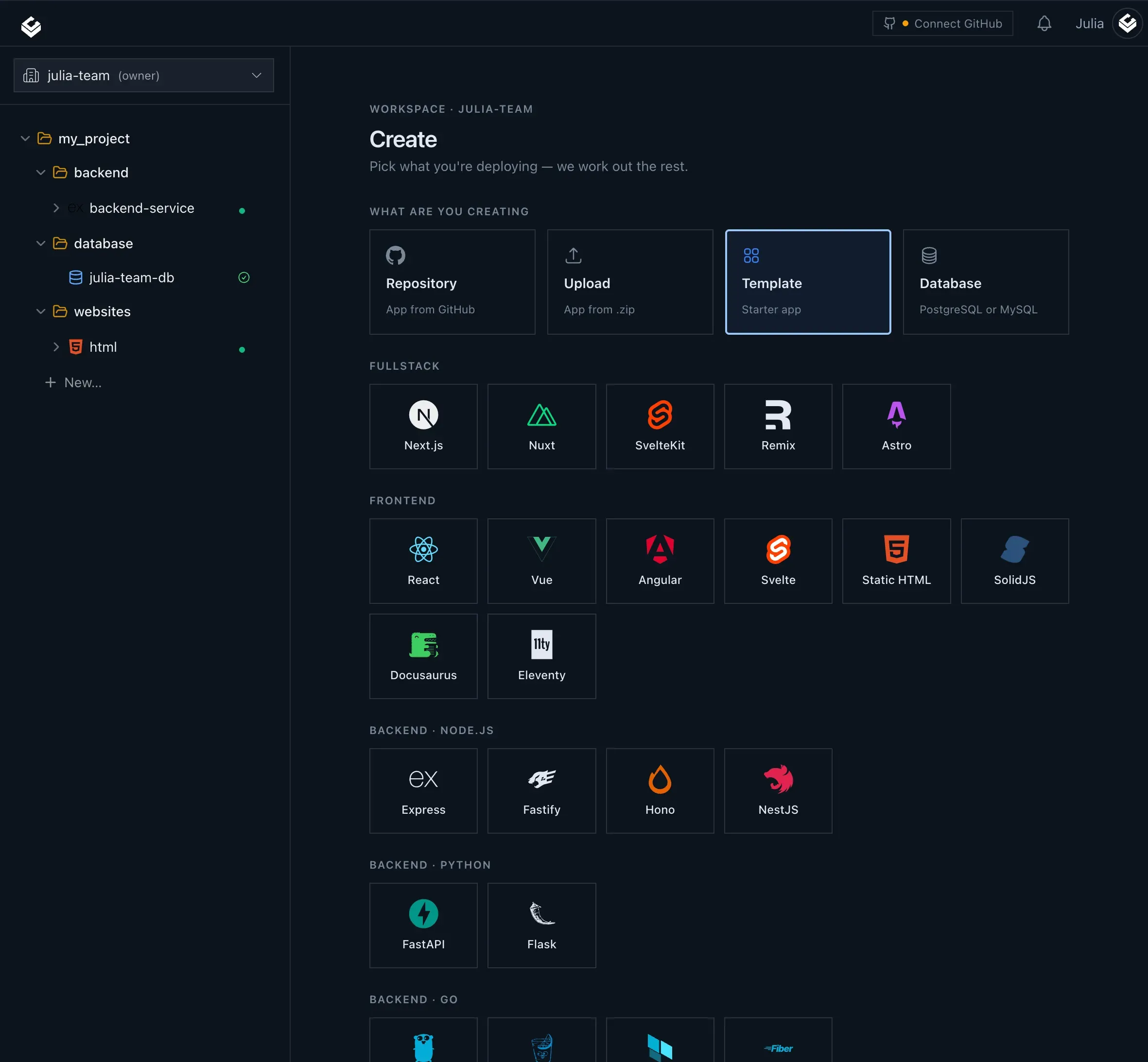
Light Cloud's user journey begins with a GitHub repository. After creating an account, users connect a repository through the console, either by selecting an existing project or importing a new one. The platform detects the type of application, determines the appropriate build strategy, and sets up the deployment pipeline automatically. Users can also specify a build command or Dockerfile if the default detection fails, but the goal is to require minimal configuration.
Once connected, every push to the main branch triggers a production build. The commit is compiled, tested, and rolled out to either the global CDN for static sites or Cloud Run for containers. Build output is streamed to the console, and the deployment history lists each commit with its author, build time, and the logs associated with that particular build. This historical record provides a clear audit trail for debugging and review.
For development workflows, every branch or pull request creates an isolated preview environment. These previews are generated on push and torn down when the branch is removed. This allows teams to test features in realtime without affecting production, and it also gives stakeholders a tangible URL to experiment with. The platform sets up the environment from scratch for each branch, so there is no risk of cross-contamination between previews.
Database provisioning is handled within the same project. Users can create a managed Postgres instance by selecting a tier and region, and Light Cloud automatically encrypts the credentials and makes them available to the application's environment variables. The database service is designed to be closely coupled with the hosting environment, which simplifies connection handling and reduces overhead. For applications that require custom configurations, the console provides fields to set additional environment variables or secrets.
The platform also supports an AI-assisted workflow. Through the MCP server, Claude can perform operations like creating an app or fetching deployment status. The VS Code extension adds a chat command, /deploy, which hooks into GitHub Copilot. Users can also rely on framework detection to ensure correct build settings, reducing the need to write configuration files. The integration is still evolving, but the existing capabilities are a step toward natural-language infrastructure management. The official documentation at docs.light-cloud.com provides a comprehensive guide to all available commands and setup steps.
After deployment, users can monitor logs and metrics from the console. Build logs are available immediately, and runtime metrics such as request count and latency are displayed next to the service. This integrated observability creates a loop where developers can push, see results, and troubleshoot without switching tools. For teams that need to collaborate, the console can be shared with other members, and permissions can be restricted to specific projects or environments.
Ideal Client Profile
Light Cloud serves development teams and individuals who want to move quickly from code to a live URL. The platform is especially useful for several concrete profiles.
-
A solo developer or small startup building a full-stack application wants to host a React frontend, a Node.js API, and a Postgres database without manually configuring separate cloud services. Light Cloud unifies these components, so the entire stack is deployable from a single GitHub repository. The developer can focus on writing code rather than wrestling with infrastructure, and the free plan makes it easy to start.
-
An agency that builds custom websites for multiple clients needs to provide staging links for feedback. The preview-per-branch feature gives each client a unique URL for every revision, making the review process straightforward. The auto-cleanup prevents staging environments from accumulating and helps the agency avoid surprise bills for idle resources. The ability to share a live preview immediately after a push speeds up client sign-off.
-
A product team using an AI assistant like Claude or GitHub Copilot wants to trigger deployments from a conversation. The MCP server and VS Code extension enable natural language commands that create apps, deploy, and show logs, fitting into a modern AI-augmented development workflow. This profile is particularly relevant for organizations that have embraced AI coding tools and want to extend that capability to operations.
-
A company with variable traffic patterns, such as an API for a seasonal business, benefits from the scale-to-zero behavior. The container service stops billing when idle, and the platform charges only for the time the app actually runs. This makes Light Cloud cost-effective for fluctuating workloads, such as a mobile app backend that sees spikes during peak hours and nearly no traffic at night.
-
A developer who values observability without configuration appreciates having build logs, runtime metrics, and deployment history in one place. Rather than assembling a separate stack for logging and metrics, the console provides the essential operational data. This is especially useful for side projects or internal tools where setting up a dedicated monitoring solution would be overkill.
These profiles represent the sweet spot: teams that already use GitHub, value automation, and prefer a managed platform over manual infrastructure management.
Pricing & Engagement Models
Light Cloud offers a free plan that allows users to start deploying immediately without a credit card. The free tier includes a limited number of deployments and standard performance, suitable for personal projects or evaluation. As users scale, they can move to a paid subscription that bills based on usage, including compute time for containers, bandwidth for static sites, and database storage for Postgres.
The pricing model is largely pay-as-you-go. Container usage is measured in increments of instance time, which aligns with the scale-to-zero feature. Static site hosting is billed by bandwidth and build minutes. Managed Postgres has tiered pricing based on CPU, memory, and storage size. There are no long-term contracts, and users can change plans at any time.
For teams requiring predictable budgets, there is a monthly subscription option that includes a set amount of resources. The exact pricing details are available on the pricing page. Light Cloud also provides an open-source route through its Labs, where users can deploy to their own cloud accounts using the ICE tool, which remains free.
Given that the product is still evolving, pricing and included resources may adjust as the platform matures. The transparent pay-for-what-you-use model is especially attractive to startups and smaller teams, as it avoids overprovisioning and aligns with actual consumption.
Editorial Assessment
Light Cloud is a compelling option for developers and small teams that want a straightforward path from GitHub to a full-stack application. The integration of static hosting, container runtime, and managed Postgres in one platform is genuinely convenient, and the AI deployment features are forward-thinking even if they are still young.
The platform's strength lies in its automation and clean developer experience. Framework detection, preview environments, and scale-to-zero containers remove much of the friction traditionally associated with cloud deployment. The bundled observability is a plus for teams that would otherwise need to configure separate log and monitoring services.
However, the product is relatively new, and there are trade-offs. The documentation and community ecosystem are not as extensive as those of established rivals like Vercel or Netlify. Companies with very high traffic or complex container orchestration needs may find the feature set limited. The pay-as-you-go model, while flexible, may lead to unpredictability for applications with consistent high usage.
Overall, Light Cloud is best suited to startups, small development teams, and individual developers who value simplicity and speed. Teams that require a mature platform with a vast plugin ecosystem or extensive enterprise governance might explore alternatives. Given its current trajectory and open-source commitment, Light Cloud is a platform to watch.