Overview
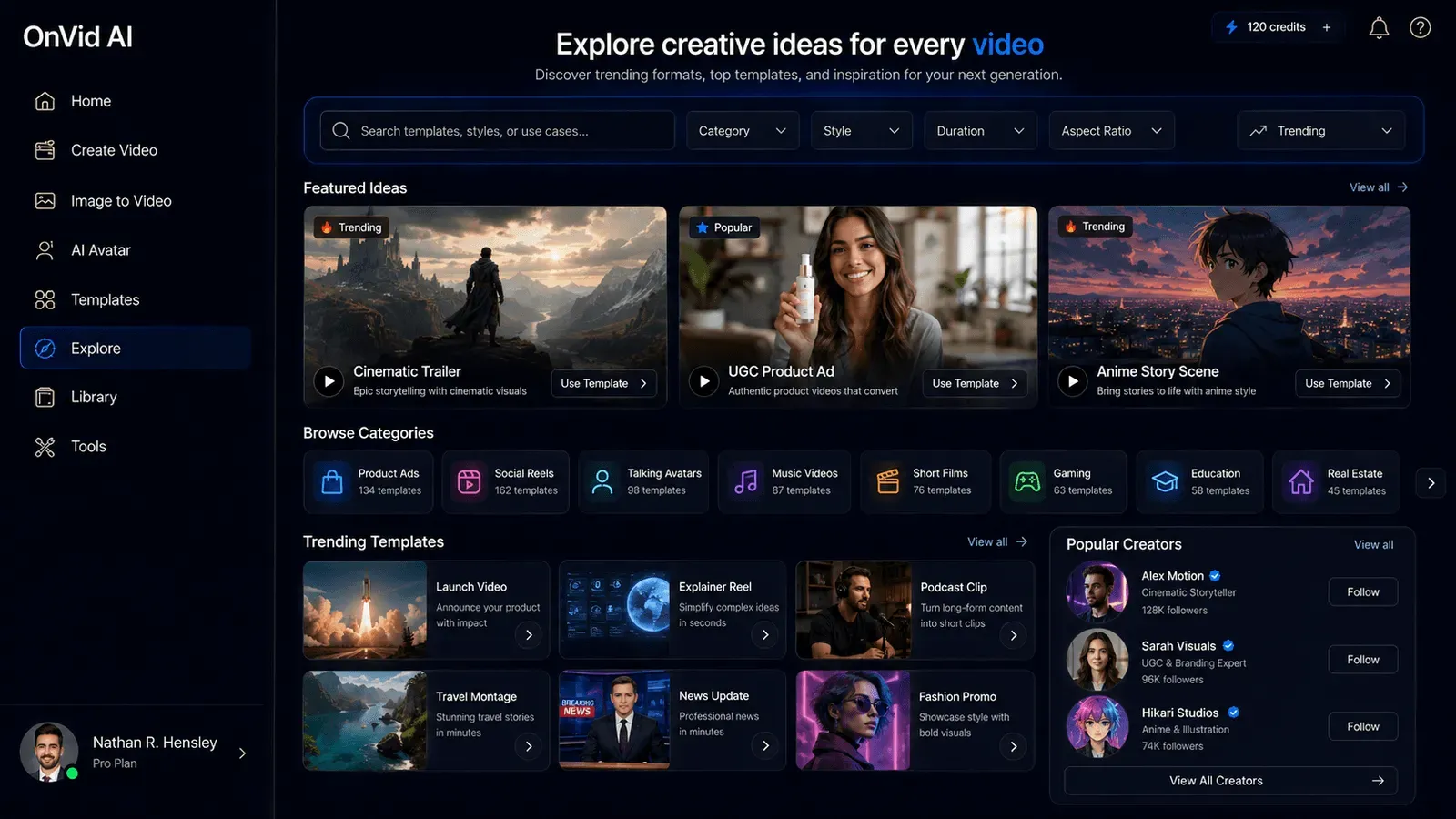
OnVid is an online AI video generation platform that converts text prompts or uploaded photos into finished HD videos in seconds. The service targets a broad audience, from casual creators and social media enthusiasts to small business owners and marketing professionals who need quick, polished video content without learning complex editing software. OnVid positions itself as a free-to-start tool with no watermark, supporting over 140 languages and a full creative suite that includes style presets, length customization, and access to multiple leading AI video models.
The platform aggregates several of the most advanced video models currently available, including Kling 3.0, Veo 3.1, Seedance 2.0, Hailuo 2.3, and others, all within a single interface. This approach allows users to choose the model that best fits their project, whether they prioritize cinematic quality, native audio, fast generation, or long-form output. OnVid reports that more than 120,000 creators have used the service, earning a 4.8/5 average rating from user reviews. The platform is accessible from any modern web browser and requires no signup for initial use, making it one of the more approachable AI video generators available in 2026.
Services & Expertise
OnVid offers a range of AI-powered video creation and editing capabilities, all designed around simplifying the video production process. Below are the core services and features detailed on the website:
-
Text to Video AI Generation: Users type a descriptive prompt, and OnVid generates a complete video scene based on that text. This service is ideal for turning ideas, stories, or concepts into visual content without needing a camera, actors, or filming equipment. The system builds scenes from the prompt, and users can download the resulting video directly.
-
Image to Video AI Generation: A single still photo can be uploaded and transformed into a moving scene with added motion, depth, and camera movement. This feature is particularly appealing for animating personal photos, travel shots, pet pictures, or product images, giving static visuals a dynamic, shareable quality.
-
AI Video Editor: OnVid includes a built-in editor that allows users to refine and adjust their generated videos. While the exact editing tools are not fully detailed on the homepage, the platform advertises a creative suite that goes beyond simple generation, offering tools for trimming, styling, and enhancing footage.
-
Style Presets and Customization: Users can choose from predefined styles such as cinematic, photoreal, fantasy, product ad, claymation, and action before generating. This allows the AI to target a specific look and mood, reducing the need for iterative prompting. Descriptions can also be customized further for unique visual outcomes.
-
AI UGC Video Generator: A specialized tool for creating user-generated content style videos, commonly used for social media campaigns, testimonials, or authentic-looking brand promotions. This feature helps marketers produce UGC-style ads without hiring actors or filming.
-
AI Video Ad Generator: OnVid provides a template or workflow specifically for producing advertising videos. This is designed for small businesses and marketers who need quick, effective video ads for platforms like Instagram, TikTok, or YouTube, without requiring a professional production team.
-
Multi-Model Access: The platform gives users access to a curated list of top AI video models, including Kling 3.0, Veo 3.1, Seedance 2.0/2.5, Hailuo 2.3, MiniMax H3, FLUX 3, and Grok Imagine. Each model has distinct strengths, such as resolution, audio support, clip length, and motion quality, allowing users to select the best fit for their project.
-
HD Download and Sharing: Videos can be downloaded in high definition and shared via direct links. This feature ensures the final output is usable across different platforms, from personal chats to social media posts, without additional conversion steps.
-
Multilingual Support: OnVid supports generation in over 140 languages and offers its interface in English, Spanish, Portuguese, German, Italian, and French. This global accessibility makes the tool valuable for non-English-speaking creators and international teams.
How They Work
The user journey on OnVid is structured to be fast and intuitive, requiring no prior video editing experience. The process starts when a user visits the website and is presented with a prominent call-to-action to create a video. The workflow typically follows three main steps:
-
Input: The user types a text prompt describing the desired scene or uploads a single photo. The prompt can be as simple as "a golden retriever running on a beach at sunset" or more detailed with specific actions and settings. For photo-based generation, the user provides the image and the AI interprets it as the visual base.
-
Configure: After input, the user selects the desired video length, choosing from options that may range anywhere from a few seconds to longer clips (depending on the model). They also pick a style preset, such as cinematic, anime, or realistic, and can select a specific AI model from the available list. The interface displays the chosen settings before generation, giving users control over the final output.
-
Generate and Export: Once the configuration is confirmed, OnVid generates the video. This process takes seconds for shorter clips, though longer or higher-resolution videos may take more time. After generation, the user can preview the video, download it in HD, or share it via a link. The platform notes that no signup or credit card is required to start, and the first video can be created entirely free.
OnVid’s methodology relies on cutting-edge AI models that are continuously updated to improve visual quality, motion consistency, and audio realism. The platform serves as a unified gateway to these models, saving users the hassle of maintaining multiple subscriptions and learning different interfaces.
Ideal Client Profile
OnVid is designed for anyone who needs video content quickly but lacks the time, skills, or resources to produce it traditionally. The following are typical scenarios where OnVid proves particularly useful:
-
A content creator or social media influencer who needs a steady stream of short, engaging videos for TikTok, Instagram Reels, or YouTube Shorts. They can use text prompts to generate on-trend clips without filming, allowing them to post more frequently and grow their audience.
-
A small business owner or marketer who wants to create promotional videos for products or services but operates with a limited budget. OnVid’s AI ad generator and UGC video tools enable them to produce professional-looking ads that can be deployed across social channels, reducing reliance on expensive agencies or video production houses.
-
A casual user who wants to animate a personal photo, such as a family vacation snapshot or a beloved pet, to create a memorable, shareable moment. The image-to-video feature turns static memories into moving scenes that can be sent to friends and family via messaging apps.
-
A YouTube hobbyist who needs supporting footage or full video segments without a camera. They can type descriptive prompts to generate visuals that match their script or narration, then download HD files to edit into their videos, saving time and production effort.
-
An international team or creator who requires localized content. With support for over 140 languages, OnVid can generate videos with text or narration in multiple languages, making it easier to adapt campaigns for global audiences.
Pricing & Engagement Models
OnVid’s homepage emphasizes that the platform is free to start and requires no signup or credit card for initial use. However, the exact pricing structure is not fully disclosed on the site. The platform mentions that export details can vary by plan or option, suggesting that there may be tiered subscriptions or pay-per-use credits for advanced features such as longer videos, higher resolutions, or commercial licenses.
Typical engagement starts with a user generating a few videos for free to test the service. Once they hit limits or require premium features, they would likely subscribe to a monthly plan or purchase credits. The platform’s “Create your video free” call-to-action and the presence of a signup page indicate that an account system supports future purchases or usage tracking. While specific pricing tiers are not listed, the engagement model is designed to be low-friction: users can get immediate value without commitment, then upgrade as their video needs grow.
Why Consider Them
OnVid differentiates itself by offering a single platform that aggregates multiple leading AI video models, eliminating the need for users to subscribe to several separate services. This consolidation is a significant advantage for creators who want flexibility in model choice without managing multiple accounts and interfaces. Additionally, the platform’s free-to-start approach, no watermark on exports, and support for 140+ languages make it an attractive option for a diverse, global user base.
With a 4.8/5 user rating and an audience of over 120,000 creators, OnVid has already established credibility within a short period. The platform’s focus on simplicity, from the three-step workflow to the intuitive interface, ensures that users can generate professional-looking videos in minutes, even without prior editing experience. For those seeking a practical, cost-effective AI video solution, OnVid presents a compelling choice worth testing.