Overview
MySOP.guru is a Chrome extension that transforms any web-based workflow into a professional Standard Operating Procedure (SOP) document. The platform is designed for teams and consultants who need to document processes occasionally, such as HR onboarding, finance month-end close, IT system changes, or client handovers. Instead of paying a monthly subscription, users pay only when they export a document, making it a cost-effective alternative for low-frequency documentation needs. The extension captures every click, form entry, and page transition, automatically generating numbered callouts and full-page screenshots. Users can then edit the captured steps, add branding, and export as a PDF or HTML file. The first export is free, with no credit card required, and subsequent exports cost €5 per PDF or €3 per HTML. Pricing is transparent and aligned with usage, and credit bundles offer discounts for teams that document more regularly. The company is headquartered in the EU, and all data is stored on EU infrastructure, providing peace of mind for businesses concerned about data residency.
Services & Expertise
-
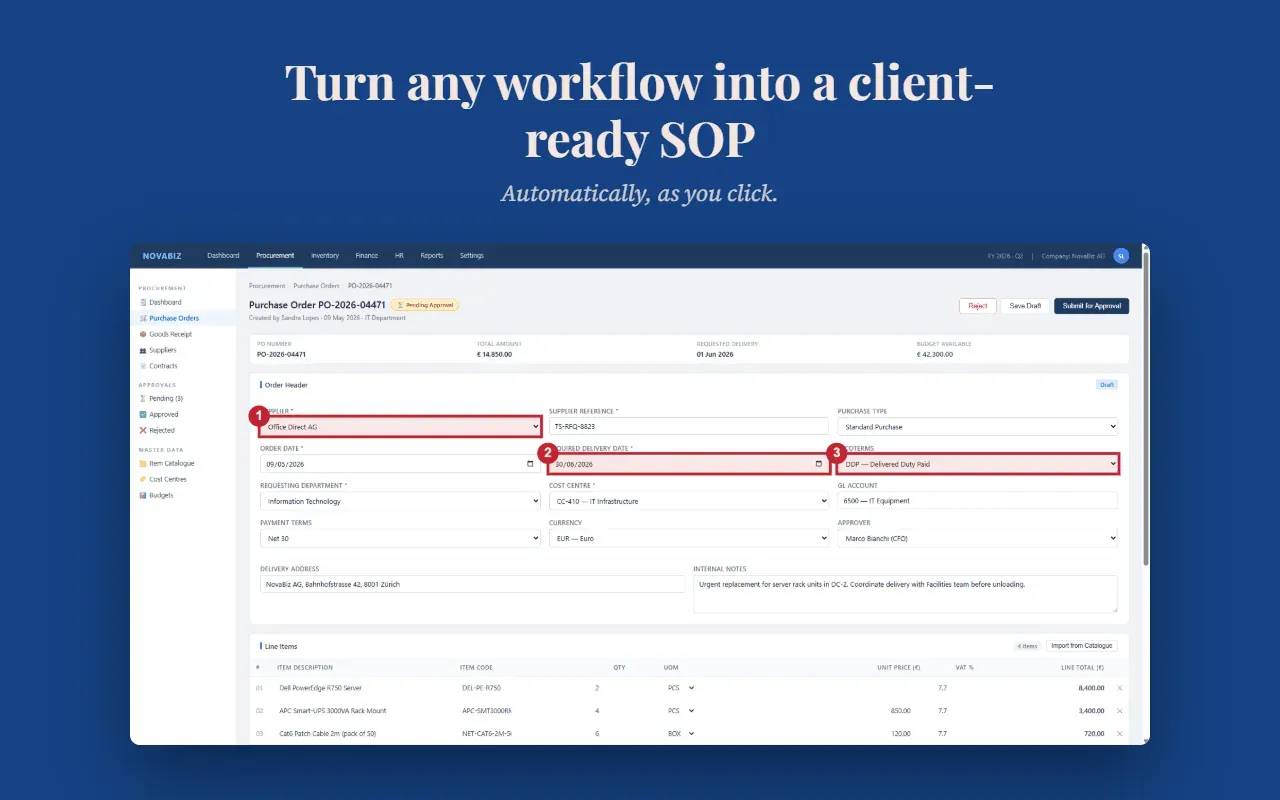
Automatic Workflow Capture: The Chrome extension monitors your interactions only during an active capture session. It records clicks, form inputs, and navigation events, and takes a full-page screenshot for each new page. Numbered badges are overlaid on the elements you interacted with, making it obvious what to click at each step. This eliminates the need for manual screen captures and note-taking.
-
Professional PDF Export: Exports are generated as polished PDFs that include your logo, custom fonts, colours, headers, footers, and page numbers. The layout is clean and ready to send to stakeholders, clients, or new hires. The PDF is produced instantly after payment and is yours forever, with no access fees.
-
HTML Export for Intranets: For teams that prefer to publish documentation on internal portals or knowledge bases, the HTML export option provides the same screenshots and callouts in a web-friendly format. This is particularly useful for continuous updates, as the HTML can be uploaded to a wiki or CMS.
-
Drag-and-Drop Editor: The web-based editor allows you to reorder steps by dragging, edit inline text, split or merge steps, and delete unwanted content. You can also add custom notes to any step. This gives you full control over the document before you spend any money, as editing is always free.
-
Branding Customization: In the account settings, you can upload your logo, select fonts and colours, and configure custom header and footer text. This ensures that every exported document reflects your organisation's identity, and clients or employees cannot tell that the SOP was generated by a third-party tool.
-
Smart Page Grouping: When multiple interactions occur on the same page, the extension groups them into a single step with a numbered list of sub-actions. This keeps the SOP concise and easier to follow, avoiding unnecessary page breaks.
-
Pay-per-Export Pricing: The core pricing model is simple: capture and edit for free, pay only when you export. The first export is free, and subsequent exports are charged per document. Credit bundles provide volume discounts, and credits are valid for 24 months. There are no hidden costs, and you can cancel anytime.
-
Data Privacy and Security: The extension is privacy-conscious. It does not run in the background, and it only activates when you start a capture session. All data is stored on Cloudflare R2 in the EU, with the database and backend hosted on EU infrastructure. Connections are encrypted with HTTPS, and no data is sold or used to train AI models. Capture sessions are automatically deleted after 12 months, and users can request account deletion at any time.
How They Work
The process is designed to be as fast as possible. First, the user installs the Chrome extension from the Chrome Web Store, a one-click operation. When ready to document a workflow, they click the toolbar icon to begin a capture session. The extension then asks for permission to access the current page, which can be granted for the session only. As the user performs the workflow, the extension records every action and takes screenshots. Once the workflow is complete, the user clicks "Stop" and is redirected to the MySOP.guru web editor. Here, they see a list of steps, each with its screenshot and a short description. The user can review the steps, edit texts, reorder, and apply branding. After finalising the content, they click "Export PDF" or "Export HTML". The first export is free; for subsequent exports, the user is directed to a secure Stripe payment page. The document is generated and available for immediate download. The entire time from starting the capture to obtaining a polished document can be well under five minutes for a typical process.
Ideal Client Profile
-
A growing HR team that needs to create onboarding documentation for new starters, including system access and account setup procedures. With MySOP.guru, HR can capture the steps while onboarding the first new starter, then reuse the same SOP for every subsequent hire, saving hours of manual writing.
-
A finance department tasked with documenting a month-end close process. The person who runs the close may be the only one who knows the exact sequence; MySOP.guru allows a quick capture of the steps, ensuring the knowledge is preserved before a vacation or departure.
-
An operations manager preparing a handover for an employee who is leaving. Instead of a rushed interview, the manager can record the operational workflows as they are actually performed, creating an accurate SOP that the replacement can follow.
-
An IT administrator who has just configured a new CRM or internal admin panel. Within minutes of completing the configuration, they can document the new process, avoiding a backlog of support tickets and providing clear guidance to the helpdesk.
-
A consultant or agency that implements software for clients and needs to deliver user documentation. MySOP.guru allows them to produce branded SOPs that carry their logo and match their quality standards, enhancing the perceived value of the engagement.
-
A small business that has one person who handles a critical process, such as order fulfilment or inventory management. MySOP.guru enables quick documentation of that process, reducing key-man risk.
Pricing & Engagement Models
MySOP.guru operates on a transparent, usage-based pricing model. There are no monthly fees, no seat limits, and no minimum commitments. The free tier includes unlimited capture and editing, plus one free PDF export. After that, a PDF export costs €5 and an HTML export costs €3. Prices are per document, excluding VAT, which is calculated at checkout. For teams that expect to export more frequently, credit bundles offer savings: 10 documents for €40 (20% discount) and 25 documents for €90 (28% discount). Credits are valid for 24 months from the date of purchase, and the company sends email reminders before any credits expire. Payment processing is handled securely by Stripe. Users never have to worry about being locked into a subscription, and they can stop using the service at any time without penalty.
Why Consider Them
MySOP.guru differentiates itself by aligning pricing with actual usage. Traditional documentation platforms charge $15–29 per user per month, which is wasteful for teams that only create a few SOPs a year. By contrast, MySOP.guru charges only when a document is exported, making it one of the most cost-efficient options for occasional documentation needs. The platform is also privacy-focused, with no background monitoring and EU-based data storage. The output quality is professional, with branded exports that look as if they came from your own team. For small businesses, consultants, and departments that need to document processes without a heavy IT burden, MySOP.guru offers a compelling mix of simplicity, control, and affordability.