
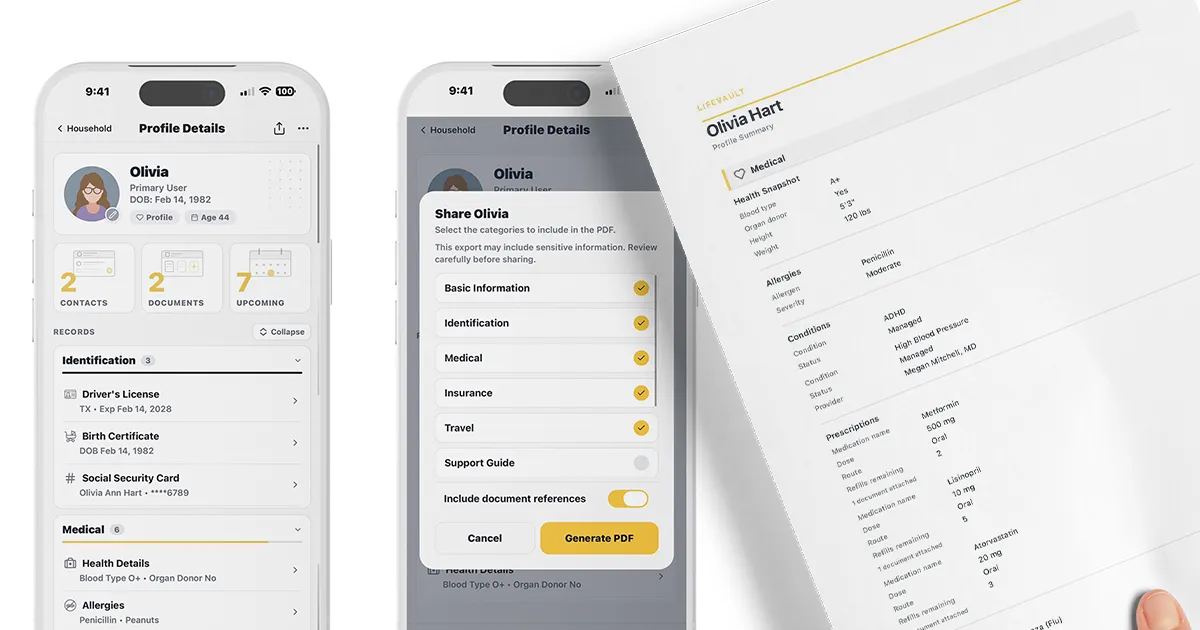
Overview
LifeVault is a private family organizer and document scanner app for iPhone, designed to transform scattered documents into structured, connected records. Developed by Pixel Street Media LLC and founded by Rachel, the app serves families, caregivers, pet owners, and individuals who need to organize important information across people, pets, and household. Launched on the App Store in 2025, LifeVault focuses on on-device privacy, allowing users to scan IDs, insurance cards, prescriptions, and other documents, extract key details automatically, and link them to the right profile. The app covers over 90 record types, from medical and legal to travel and school, and enables one-tap sharing of PDF summaries. LifeVault is free to download with optional paid plans for higher limits.
Services & Expertise
LifeVault offers a comprehensive set of features for organizing family life:
-
Document Scanning & OCR Extraction: Users can scan any document, card, or photo using their iPhone camera. LifeVault automatically extracts key details such as names, dates, and numbers, which users can review, edit, and confirm. The original document is saved in the Documents Vault and linked to the structured record.
-
Structured Records & Profiles: Each person, pet, or household gets a dedicated profile with customizable sections. Records are linked to the appropriate profile, creating a connected system. For example, a prescription is linked to the person, the prescribing doctor, and the pharmacy.
-
Household Organization: The app includes a household-level profile for shared information like home details, insurance policies, warranties, utilities, vehicles, maintenance schedules, and emergency contacts. This ensures that information relevant to everyone is stored once and accessible to all.
-
Support & Care Guides: LifeVault provides a guided builder for creating support guides with seven sections: accommodations, stress and triggers, calming and support, sensory needs, transitions, safety, and caregiver notes. These guides can be shared as plain-language PDFs with teachers, caregivers, or medical staff.
-
Timeline & History: Each profile includes a timeline where users can track changes over time, such as medication adjustments, hospital stays, or document renewals. When a record is renewed or replaced, the previous version is archived, preserving a complete history.
-
Shareable PDF Summaries: Users can generate a clean, comprehensive PDF summary of any profile, selecting which sections to include. The summary can be shared via text, email, AirDrop, or any other app, making it easy to provide information to doctors, sitters, or schools.
-
Privacy & Security: All data is stored on-device, not on servers. The app uses Face ID or Touch ID for protection, and users control what is shared. No ads, no data harvesting, and no social feed.
-
Reminders & Expiration Tracking: LifeVault can remind users before IDs, insurance cards, prescriptions, or other documents expire. Renewals create a new version while preserving the old one in Archives.
How They Work
LifeVault follows a three-step process: scan, extract, and connect. Users start by scanning a document using the iPhone camera or uploading an image. The app automatically extracts key details, which the user reviews and edits as needed. Once confirmed, a structured record is created and linked to the appropriate person, pet, or household. The original document is saved in the Documents Vault and accessible from the record. Users can then customize each profile by toggling sections on or off, build a timeline of events, and generate shareable PDF summaries at any time. The entire process works offline, ensuring access during emergencies.
Ideal Client Profile
LifeVault is designed for several specific scenarios:
-
Caregivers of aging parents: A person managing medications, doctor appointments, and insurance for an elderly parent who may have cognitive decline. LifeVault keeps all records organized and shareable with healthcare providers.
-
Families with young children: Parents who need to track vaccination records, allergies, school contacts, and pickup authorizations. They can hand a sitter or grandparent a complete summary in seconds.
-
Pet owners: Someone with a pet that requires regular vet visits, medications, and boarding. LifeVault stores vaccination records, microchip numbers, feeding schedules, and a behavior guide for sitters.
-
Families with special needs: Parents of a child with autism or other conditions who need to communicate accommodations, triggers, calming strategies, and caregiver instructions to teachers and support staff.
-
Frequent travelers: Individuals or families who travel often and need quick access to passports, travel insurance, vaccination records, and emergency contacts, all organized and shareable before a trip.
Pricing & Engagement Models
LifeVault is free to download and use. The free plan includes basic features and limits on documents and family members. Higher limits may require a paid subscription, though the exact pricing is not publicly detailed on the website. Users retain access to all records they have created, even on the free plan. The app does not run ads or sell user data.
Why Consider Them
LifeVault differentiates itself from cloud storage apps and caregiver platforms by combining document scanning, structured records, and profile linking in a single, private app. Unlike Google Drive or Dropbox, which store files without extracting data, LifeVault turns documents into usable, searchable records. Unlike caregiver apps that focus on coordination, LifeVault also holds the documents themselves. Its on-device storage model ensures privacy, and the ability to generate shareable PDF summaries makes it practical for emergencies. The app is built by a founder with personal experience as a caregiver, which informs its thoughtful design for real-world family needs.