
Overview
HuddleMate is a real-time AI meeting assistant built for professionals who need to answer questions with composure during live conversations. The platform is marketed primarily toward interview candidates, sales representatives, and general meeting participants, with a secondary position for trivia events. The product operates as a browser-accessible SaaS application, with the marketing site hosted at huddlemate.ai and the working application running at app.huddlemate.ai.
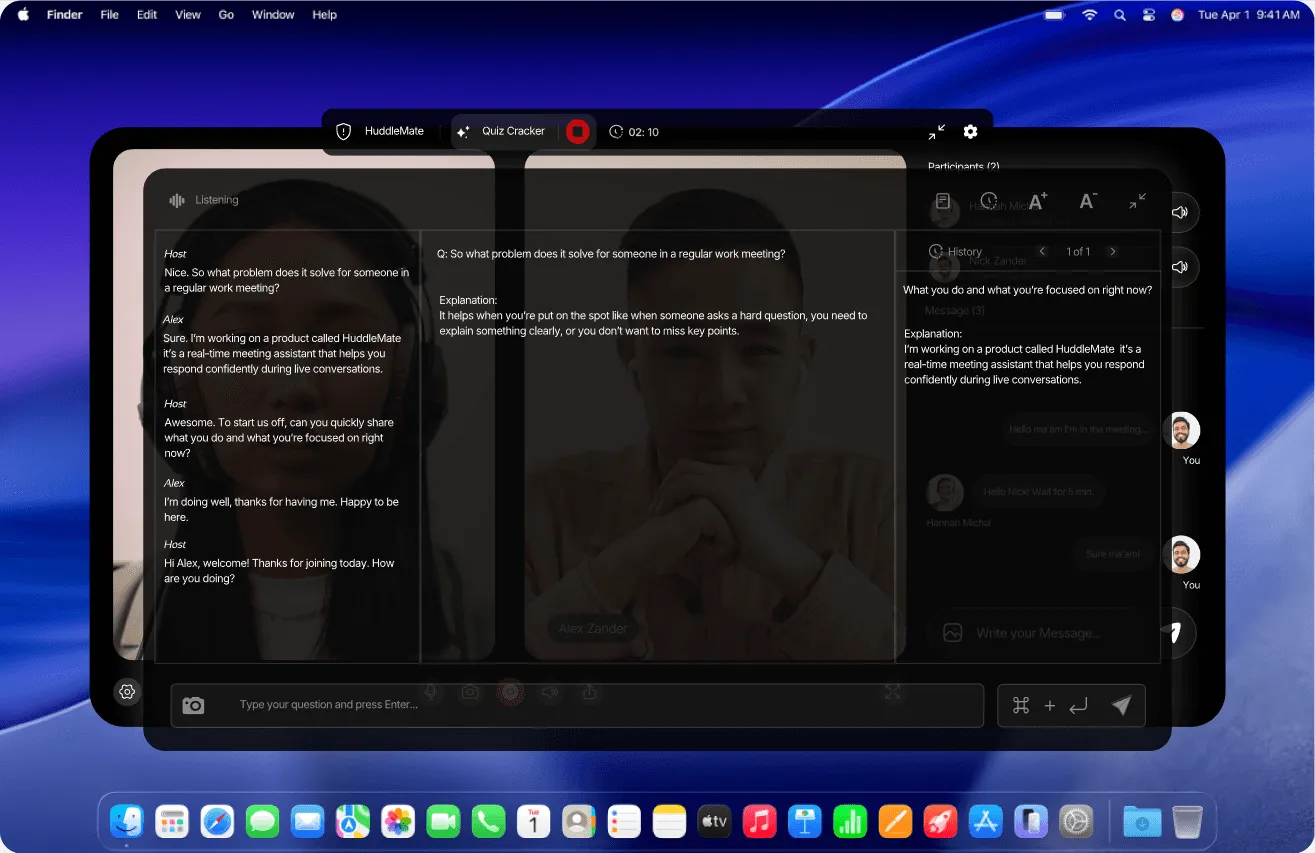
The core proposition is straightforward. HuddleMate listens to the audio of a conversation, analyzes whatever is visible on the user's screen, and then generates concise, personalized answers that appear privately on the user's own display. The company describes the experience as having a knowledgeable companion whisper the right response at the right moment, so the user can speak with confidence rather than scrambling through notes.
What separates HuddleMate from other AI meeting tools is its privacy-first architecture. The platform does not join a call as a visible participant, does not inject a bot into the meeting roster, and does not display overlays to other attendees. Instead, it processes everything privately on the user's device and remains hidden during screen sharing. That positioning addresses a common hesitation among professionals who worry that visible AI assistance could undermine their credibility with an interviewer, a client, or a manager.
The company serves both individual professionals and teams. Pricing is usage based rather than subscription based, with a free tier offering five minutes of assistance per hour and a standard plan priced at $9.99 per hour of active assist minutes. The site references thousands of users across interviews, sales calls, and meetings. Headquarters, founding date, and headcount are not disclosed on the homepage, which is a notable gap for buyers conducting deeper due diligence.
Services & Expertise
Real-Time Audio Listening and Transcription. The foundation of the product is continuous listening. HuddleMate captures the full conversation, including the user's own responses and the follow-up questions from other participants, so that the AI retains context across a long meeting. This matters in interviews where the fourth question often depends on the answer given to the second. The outcome is a live transcript that continuously feeds the assistant's reasoning engine, rather than a static batch of text delivered after the call.
Instant AI Response Generation. When a question lands, HuddleMate produces a tailored answer and places it on screen within seconds. Responses are drawn from the combination of the live conversation, the user's uploaded documents, and any screen content that is visible at that moment. The company emphasizes speed as the primary differentiator, arguing that a delayed answer is functionally useless in a live conversation. The deliverable is a spoken-ready reply rather than an essay.
Custom Knowledge Base Support. Users can upload a resume, job description, product notes, talking points, and other reference documents during setup. The assistant then grounds its answers in that material rather than offering generic advice pulled from public sources. This is especially valuable for candidates who want answers that reference their actual experience, or for sales teams that need to quote specific product specifications accurately.
Screen Analyzer for Visual Context. Beyond audio, HuddleMate reads the user's screen. That capability serves technical interview scenarios such as coding challenges, where the assistant can interpret code on screen and suggest an approach. It also helps in sales calls where a prospect shares a document, a spreadsheet, or a dashboard and expects an informed response rather than a vague one.
Multiple Response Formats. The platform supports different output styles depending on the situation. A short mode is available for fast, direct answers, while structured formats such as the STAR method are available when a detailed behavioral story is required. Switchable formats let one tool serve very different meeting types without requiring separate subscriptions or separate tools.
Invisible Overlay and Screen Share Concealment. HuddleMate is engineered to remain hidden during screen sharing. Nobody on the call sees the assistant's output, and the company describes the detection risk as effectively zero. The feature is a deliberate response to the fact that many employers and prospects view visible AI assistance as a disqualifying signal.
Cross-Platform and Mobile Availability. The assistant works across major meeting platforms rather than being locked into a single video conferencing vendor. A mobile version is also offered, extending coverage to phone interviews and impromptu calls placed away from a desk. More detail is available on the company's features page, which outlines the full capability set.
How They Work
The onboarding process is deliberately compressed into three steps. First, the user selects a copilot profile from a menu that includes interview, trivia, or a custom configuration. Each profile determines how answers are formatted and how the assistant prioritizes information. Second, the user uploads meeting data, which can include a resume, a job description, notes, or any other reference material that should influence the answers. Third, the user launches the assistant and joins the meeting as usual. From that point, HuddleMate listens and responds in real time.
The design philosophy behind this flow is that setup should take minutes rather than hours. The company claims that a user can be ready within five minutes of signing up. There is no elaborate integration step, no calendar authorization, and no bot invitation. The assistant simply runs alongside whatever conferencing software the user already uses, which keeps the technical burden low for non-technical professionals.
Because the product is usage based, sessions are metered by active assist minutes rather than by seat count or monthly subscription. A session begins when the user starts the assistant and ends when it is stopped. Minutes purchased are described as non-expiring, which removes the pressure to consume a monthly allowance before a billing cycle resets. Teams that want a guided walkthrough can book a call with the company rather than self-serving through the signup flow.
For organizations, an enterprise tier adds custom integrations, additional security controls, the ability to invite team members, and a dedicated account manager. The company also maintains a dedicated AI interview assistant landing page for buyers who want to evaluate the product specifically against interview preparation workflows.
Ideal Client Profile
Job candidates facing high-stakes interviews. A candidate interviewing at a competitive firm often needs structured behavioral answers grounded in real experience. HuddleMate's STAR format, combined with resume uploads, produces responses that sound personal rather than generic. The free tier makes initial testing low risk.
Technical candidates working through live coding exercises. A software engineer facing a shared-screen coding prompt benefits from the screen analyzer, which can interpret the visible code and suggest a direction without requiring the candidate to narrate every thought aloud while under time pressure.
Sales representatives managing objection-heavy calls. A sales professional who regularly fields pricing objections benefits from the objection-handling prompts the tool surfaces. The assistant helps maintain momentum during negotiation rather than stalling on a difficult question at a critical point in the deal cycle.
Consultants and account managers in back-to-back client meetings. Professionals who move between meetings with different context benefit from storing documents for each engagement separately. The assistant then grounds responses in the correct account rather than blending details across clients.
Teams that want a shared assist layer without visible tooling. Organizations uncomfortable with AI bots appearing on client calls find HuddleMate appealing because nothing is ever exposed to the other party. The enterprise tier adds the administrative controls needed to deploy across a team with centralized billing.
Pricing & Engagement Models
Pricing follows a consumption model rather than a flat subscription. The free tier costs nothing and provides five minutes of assistance every hour, which the company frames as sufficient for testing or occasional help. The standard plan is priced at $9.99 per hour of active assist usage and is described as most popular, aimed at interviews and important calls. An enterprise tier is quoted on request for teams and high-volume users. Full details are listed on the pricing section of the site.
Notable commercial terms include the fact that purchased minutes do not expire, that users pay only for the minutes actually consumed, and that no credit card is required to start on the free plan. Priority support is included on the standard plan. Enterprise customers gain custom integrations, enterprise-grade security, team member invitations, a dedicated account manager, and access to the full professional feature set.
Editorial Assessment
HuddleMate occupies a specific and increasingly crowded niche. Its strongest differentiator is the privacy architecture. By refusing to join calls as a bot and by concealing output during screen sharing, the platform removes the most visible failure mode of AI meeting assistants. The usage-based pricing is also refreshing in a market dominated by monthly subscriptions, and the non-expiring minute policy reduces waste for occasional users.
Limitations exist. The extremely focused positioning around interviews and sales may not suit general meeting note-taking, where competitors offer richer post-meeting summaries, action item extraction, and CRM integrations. Because the tool is designed to be invisible, there is also an ethical dimension that each user must weigh against the norms of their own workplace or industry. The lack of publicly disclosed company information, including founding date and team size, makes deeper due diligence harder for enterprise buyers.
The best fit is an individual professional or a small team that wants live, grounded assistance without alerting the other side of the conversation. Buyers looking for a comprehensive meeting intelligence platform with analytics and CRM sync should evaluate dedicated conversation intelligence vendors instead.