
Overview
BadgeFlow is a web-based SaaS tool that enables event organizers to generate print-ready PDF name badges from Excel or CSV files. The platform eliminates the need for expensive design software or professional printing services by providing an intuitive drag-and-drop editor, over 30 professionally designed templates, and support for any badge size, paper size, and printer. BadgeFlow is currently free during its beta period and requires no sign-up, making it accessible for events of all sizes, from small workshops to large conferences. The tool is designed for non-technical users and handles variable data import, QR codes, barcodes, and full customization of colors, fonts, and logos.
Services & Expertise
BadgeFlow offers a comprehensive set of features for creating event badges:
-
Template Library: Over 30 ready-to-use, professionally designed badge templates that cover various event types including conferences, trade shows, corporate training, networking events, school events, weddings, and non-profit gatherings. Users can start with a template and customize it to match their branding.
-
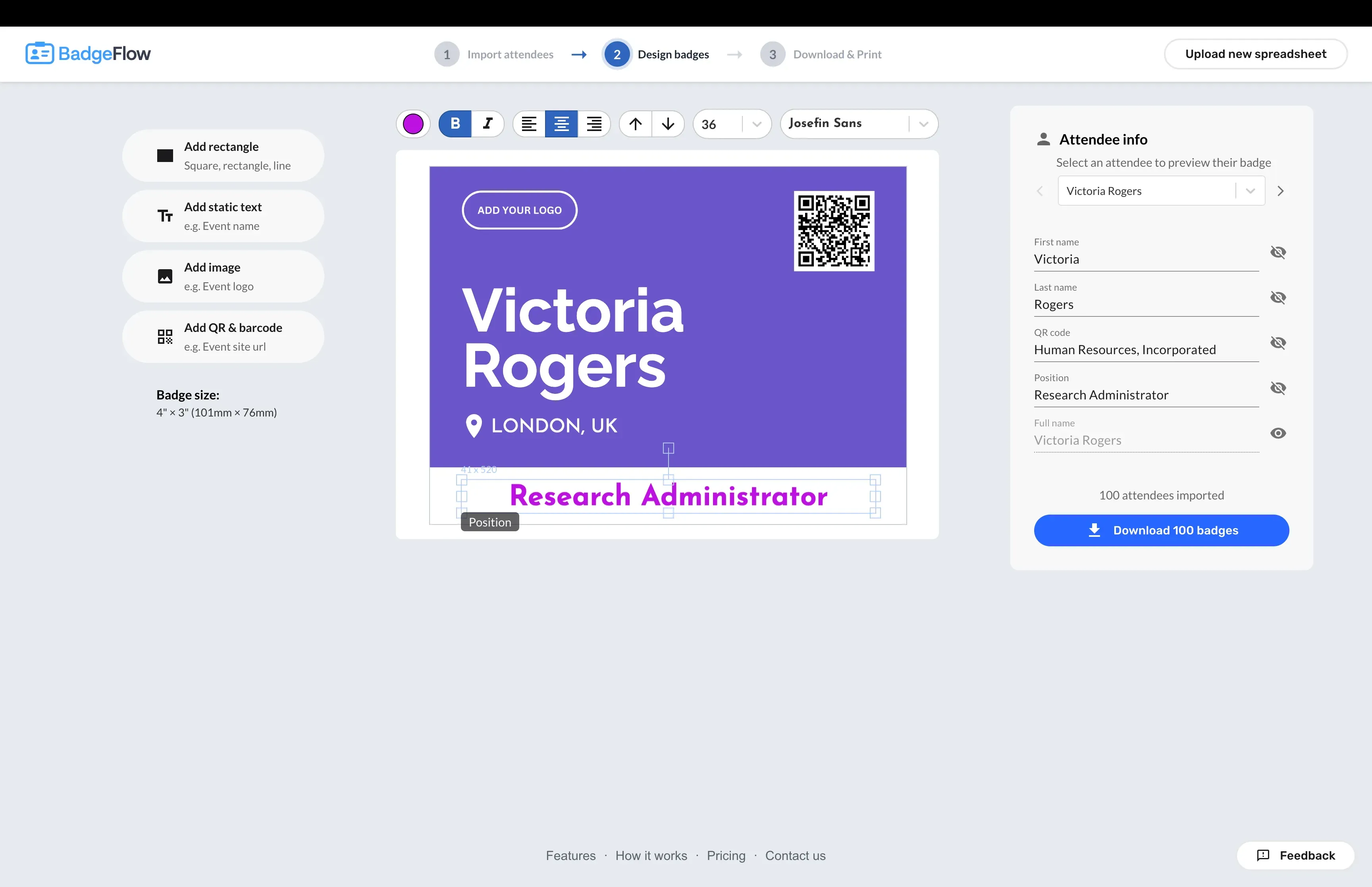
Drag-and-Drop Editor: An intuitive visual editor that allows users to add, remove, resize, and reposition text fields, images, logos, QR codes, and barcodes on the badge canvas. No graphic design skills are required.
-
Variable Data Import: Attendee data can be imported from Excel (.xlsx, .xls), Google Sheets, or CSV files. The system automatically maps spreadsheet columns to badge fields such as name, title, company, and custom fields. This enables bulk generation of personalized badges.
-
QR Codes and Barcodes: Users can add static or attendee-specific QR codes and barcodes to badges. This is useful for event check-ins, lead retrieval, and attendee tracking. Codes can encode any data from the attendee list.
-
Customizable Badge Sizes: Supports all standard badge sizes (4" x 3", 4" x 6", 3.5" x 2.25", 3" x 2") as well as custom dimensions. Users can design badges to fit any holder.
-
Flexible Paper Sizes: Badges can be printed on any paper size including A4, Letter, Legal, A3, or custom dimensions. The system automatically arranges badges optimally on the chosen paper format, with crop marks for easy cutting.
-
On-Site Printing: BadgeFlow generates print-ready PDFs that work with any inkjet or laser printer. This allows organizers to print badges on-site for walk-in registrations or last-minute changes.
-
No Sign-Up Required: The platform is accessible immediately without creating an account. Users can start designing and generating badges instantly.
How They Work
The process of creating badges with BadgeFlow is streamlined into three simple steps:
-
Upload Attendee List: Users import their attendee data from Excel, Google Sheets, or CSV. The platform automatically maps columns to badge fields, but users can adjust the mapping manually if needed.
-
Design Badges: Users choose from over 30 templates or start from scratch. The drag-and-drop editor allows customization of colors, fonts, logos, and layout. QR codes and barcodes can be added with attendee-specific data.
-
Download and Print: Once the design is finalized, users generate a print-ready PDF. The PDF includes crop marks and optimal spacing for cutting. Users can print on any paper size with any printer. No software installation is required; everything runs in the browser.
Ideal Client Profile
BadgeFlow is suitable for a wide range of event organizers:
-
Conference and Trade Show Organizers: Professionals managing large-scale events with hundreds or thousands of attendees who need to quickly produce name badges for speakers, exhibitors, and attendees.
-
Corporate Training Managers: Teams running employee training programs, workshops, or offsites who want branded badges for participants without outsourcing to a print shop.
-
Networking Event Hosts: Organizers of business mixers, meetups, and career fairs who need simple, fast badge creation with job titles and company names.
-
School and University Staff: Administrators organizing parent-teacher conferences, graduation ceremonies, or campus events requiring identification badges for visitors and students.
-
Wedding and Party Planners: Individuals planning social events like weddings, reunions, or birthday parties who want personalized name tags for guests.
-
Non-Profit and Community Organizers: Volunteers running charity fundraisers, community gatherings, or awareness campaigns who need cost-effective badge solutions.
Pricing & Engagement Models
BadgeFlow is currently free during its beta period. There are no limits on the number of badges, events, or features. Users can access all templates, customization options, QR codes, and PDF downloads at no cost. The company asks only for feedback in return. No credit card or sign-up is required to start. After beta, pricing may change, but the current model is fully free with no hidden fees.
Why Consider Them
BadgeFlow differentiates itself through its simplicity and zero-cost entry. Unlike traditional badge design software that requires installation or expensive subscriptions, BadgeFlow is browser-based and free. It eliminates the need for professional printing services, saving organizers significant costs. The platform supports any badge size, paper size, and printer, offering unmatched flexibility. The no-sign-up policy reduces friction, allowing users to start creating badges immediately. With over 30 templates and full customization, BadgeFlow competes with both free tools (which often lack features) and paid tools (which require investment). Its focus on variable data from spreadsheets makes it ideal for data-driven event management.
For more information, visit BadgeFlow's website or try the live demo.