Overview
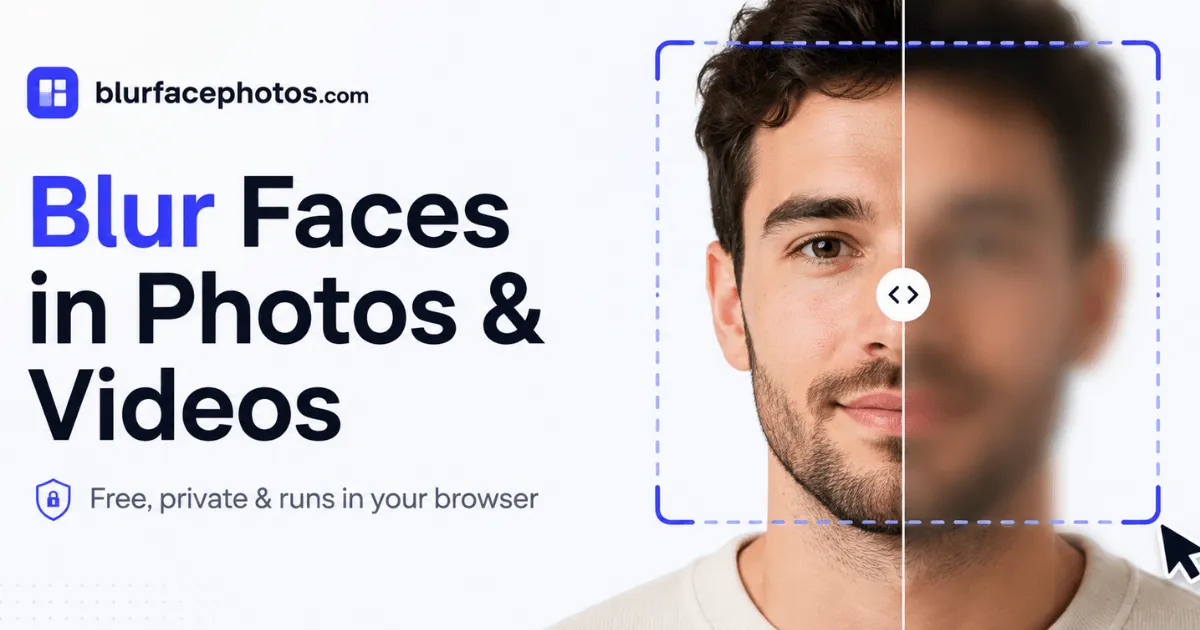
BlurFacePhotos is a privacy-first web application designed to blur, pixelate, censor, or cover faces in photographs and video clips. Operating entirely within the browser, the platform processes all media on the user's local device, ensuring that images and video are never uploaded to a server, which fundamentally reduces the risk of data breaches and unauthorized use. This architecture is a clear departure from many mainstream face blur tools that require file transfer to their own cloud infrastructure, often exposing sensitive content to security vulnerabilities. The service targets a diverse audience, including journalists who must protect sources, content creators who share footage publicly, HR teams preparing GDPR-compliant materials, and everyday individuals who simply want to share a family photo without revealing identities. Supporting common formats such as JPEG, PNG, WebP, and BMP for still images, and MP4 and WebM for video, the editor provides a rich selection of redaction effects: soft blur, blocky pixelation, classic black bars, and playful emoji overlays. The free tier is fully functional for photo blurring, offering unlimited exports without a watermark or account creation, while the Premium subscription, detailed on the pricing page, adds video blurring, full-HD and 4K video export, unlimited batch processing, and a commercial-use license. As a freemium SaaS product, BlurFacePhotos aims to make professional-grade privacy tools available to a non-technical audience, removing the need for expensive editing software or risky third-party services. It also positions itself as a solution for teams that need to anonymize media at scale without sacrificing data sovereignty, with a planned API for enterprise integration. The website itself reinforces its privacy story by employing cookieless analytics and displaying a GDPR compliance badge in the footer, signaling that even the platform's own tracking is minimized.
Services & Expertise
BlurFacePhotos provides a focused but versatile set of services around facial anonymization, each designed to meet specific privacy needs. Every effect can be applied to the entire face, the eyes, or the mouth, offering granular control over what gets hidden.
Photo Face Blurring - The core function allows users to upload images and apply a soft, natural blur to selected faces. The detection engine automatically identifies up to five faces per image in the free version, and the user can choose to blur the entire face or focus on specific regions such as the eyes or mouth. The output is a downloadable PNG file that retains high quality while ensuring privacy. This service is ideal for photographers and editors who need a quick, no-fuss solution without installing desktop software.
Pixelation and Mosaic - For those who prefer a blocky, retro aesthetic, the pixelate effect transforms selected areas into a mosaic. This style is commonly used in documentaries and news reports to obscure identity while preserving the context of the scene. The intensity of the pixelation is adjustable, giving users control over the level of anonymization. It is also a favorite for adding a visually distinctive look to non-consenting subjects, as the mosaic is instantly recognizable as a privacy shield.
Black Bar Censor - The classic censorship bar places a solid black rectangle over the eyes or the whole face, drawing attention to the fact that identity is hidden. This effect is often used in interviews or public footage where individuals have not consented to being shown, and it is a simple, effective method that requires no fine-tuning. The black bar is particularly effective for legal or compliance contexts where a clear visual indicator of redaction is necessary.
Eyes-Only Redaction - Recognizing that the eyes are often the most identifiable feature, the platform allows users to blur or pixelate just the eye area while leaving the rest of the face visible. This targeted approach is popular in content where maintaining some facial expression is important, such as testimonials or personal stories. It provides a balance between protecting identity and preserving human connection in the image.
Emoji Stickers - A playful alternative to traditional effects, the emoji sticker covers the face with a customizable emoji symbol. This feature is widely adopted by vloggers and social media influencers who want to maintain a light-hearted tone while protecting identities. The sticker can be resized and repositioned, and it adds a layer of creativity to the anonymization process. It is also an effective way to add brand character to user-generated content.
Video Face Tracking and Blurring - The video mode uses advanced object tracking to detect faces in every frame of an MP4 or WebM file and applies the selected redaction consistently across the entire clip. This eliminates the need for manual frame-by-frame editing in desktop software like Premiere Pro or CapCut. Users can export the anonymized video as WebM, and Premium subscribers gain access to full-HD and 4K resolutions. The automatic tracking ensures that faces remain hidden even as subjects move throughout the footage.
Batch Photo Processing - For workflows involving multiple files, the tool supports uploading several images at once. The free plan allows batches of up to five photos, while Premium users can process unlimited images in a single run, making it easier to anonymize entire folders for publishing or internal distribution. This feature is particularly valuable for newsrooms or social media teams that need to redact multiple files in one session.
Each service is delivered through a clean, intuitive interface that minimizes the learning curve, and the underlying technology is powered by client-side machine learning models, which means no data is ever transmitted to a server.
How They Work
The user journey begins by navigating to the editor, where three input modes are offered: Image, Camera, and Video. For the Image mode, a drag-and-drop area accepts JPG, PNG, WebP, or BMP files. Once uploaded, the browser's built-in machine learning model detects faces instantly and overlays bounding boxes on each identified face. The user then selects an affected area, such as eyes, mouth, or the whole face, and chooses an effect from a horizontal menu that includes blur, pixelate, black bar, emoji, and others. A before-and-after comparison slider is available for previewing the result in real time, allowing the user to verify that the redaction meets their expectations before exporting. The final step is a one-click download, which exports the anonymized photo as a PNG file. Importantly, no account is required for this entire process, and the tool works on both desktop and mobile devices.
For video, the workflow is similar: the user drops in an MP4 or MOV file, and the system analyzes each frame to track faces across the timeline. After processing, a preview clip plays with the redaction applied, and the user can export the full video as WebM. The video export speed depends on the length and resolution of the source file, but since processing is local, there is no bandwidth bottleneck. The camera mode turns the device's webcam into a live anonymization tool, streaming the modified feed in real time, which is useful for presentations, virtual meetings, or live streams where participants might want to obscure their appearance on the fly.
The entire system is built around local processing, using WebAssembly and client-side JavaScript to run deep learning models directly in the browser. This architecture ensures data privacy, reduces latency, and removes the need for users to trust a third-party server with sensitive imagery. The interface is deliberately minimal, with clear calls to action and tooltips that guide new users through each step. Privacy-conscious users will appreciate that the site does not track or store any uploaded media, and the features page provides a more detailed breakdown of input types and technical requirements. Moreover, because the site uses a cookieless analytics script, no tracking cookies are dropped on the visitor's machine, further aligning with its privacy-forward ethos.
Ideal Client Profile
-
Independent journalists and documentary filmmakers who need to protect sources or bystanders in their footage without relying on complex editing suites. The video tracking feature is particularly useful for interviews in public spaces where consent is limited, and the ability to blur faces in real time can be a lifesaver when publishing quickly.
-
Social media managers and content creators subject to platform rules about identity protection or who simply want to respect the privacy of people caught in the background. They can quickly anonymize faces in user-generated content or group photos before publishing, using the emoji or pixelation styles to maintain brand tone and engagement.
-
HR and compliance teams responsible for GDPR and other privacy regulations. They often need to redact faces in internal photos, training videos, or disciplinary documents. The local processing model guarantees that sensitive employee imagery never leaves corporate devices, which is a critical requirement for organizations with strict data governance policies.
-
Small and mid-sized businesses that publish case studies, event photos, or marketing collateral and want to blur faces of non-consenting participants. The free photo plan offers a zero-cost solution for occasional use, while the Premium tier provides batch capabilities and video editing for larger projects, all without a costly creative software subscription.
-
Everyday consumers sharing family photos online or on messaging apps. Parents may wish to obscure their children's faces in public social media posts to reduce their digital footprint. The one-click flow and no-sign-up requirement make it accessible to non-technical users, and the fact that photos are never uploaded gives peace of mind.
Each of these personas benefits from the fact that there is no upload, which means no privacy risk, and the tool works across devices without installation. The platform's ability to handle both stills and motion content also means users do not need to switch between multiple tools for different types of media.
Pricing & Engagement Models
BlurFacePhotos operates on a freemium subscription model, with a clear separation between what is free and what requires payment. The Free plan is ad-supported and provides unlimited photo blurring with up to five faces per image, batch processing of up to five photos at once, and access to all effect styles. No watermark is added, which is a rarity among free editing tools, and users do not need to create an account or give an email address.
The Premium plan removes ads and adds video blurring, unlimited batch processing, full-HD and 4K video exports, and a commercial-use license. It is priced at $4.99 per month when billed annually (approximately $59.88 per year) or $8.99 per month on a monthly rolling basis. All premium features are immediately unlocked upon payment, and there is no long-term contract beyond the chosen subscription term. The annual option represents a 44% discount compared to the monthly rate, making it an attractive choice for professionals who use the tool regularly.
An API and Business tier is planned with a starting price of $49 per month, intended for companies that need server-side anonymization at scale. This tier will offer a REST API with pay-as-you-go credits, bulk processing, and priority support. The pricing model is transparent, with no hidden fees and no requirement to upload any data, preserving the privacy promise of the platform. The free tier remains genuinely useful, which is rare in the online editing space, and the paid tiers are designed to scale with the user's needs, from occasional redactions to high-volume production.
Editorial Assessment
BlurFacePhotos stands out for its uncompromising commitment to privacy. The fact that all face detection and redaction happens locally is a major differentiator in a market where many tools secretly upload user content to servers. The range of effects and the ability to target specific facial features make it suitable for a variety of professional and personal use cases. The free tier is generous, and the premium pricing is modest compared to subscription costs of full-featured video editors, making it an attractive option for budget-conscious users.
On the downside, the free plan's limitation of five faces per image and batch size of five photos may be restrictive for users working with group scenes or large datasets, though it is understandable given the compute constraints of browser-based processing. Video blurring is gated behind the paid plan, which could disappoint those who only need occasional one-off video anonymization, especially since many competing tools offer limited video editing for free. Additionally, since the tool runs entirely in the browser, performance on older devices or with long video files may be slower than native desktop applications, and users with unreliable internet connections may experience hiccups when loading the large JavaScript bundle.
The best fit is a privacy-conscious individual or small organization with moderate needs for photo and occasional video redaction. Heavy users who regularly process large batches or high-resolution video may find native software more efficient, but they will lose the hands-off security of a no-upload workflow. For anyone curious about common issues or looking for troubleshooting tips, the FAQ page offers detailed answers. Overall, BlurFacePhotos delivers on its core promise: a fast, private, and accessible way to blur faces online, without compromising on data security.